> For the complete documentation index, see [llms.txt](https://docs.rowsncolumns.app/llms.txt). Markdown versions of documentation pages are available by appending `.md` to page URLs; this page is available as [Markdown](https://docs.rowsncolumns.app/configuration/features/version-comparison.md).
# Version comparison
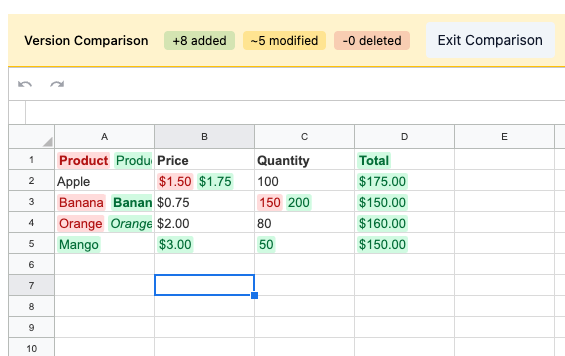
The version comparison feature allows users to compare two versions of a spreadsheet and visualize differences inline. Changes are highlighted with distinct colors for added, deleted, and modified cells.
Spreadsheet version comparison UI
## Overview
Version comparison is useful for:
* Tracking changes between document revisions
* Reviewing edits before accepting them
* Understanding what changed between snapshots
* Collaboration workflows where multiple users edit the same document
## Visual Highlighting
| Change Type | Background | Text Color | Description |
| ------------ | ----------------------- | -------------------------- | ----------------------------------------------------------------------- |
| **Added** | Light green (`#d0fae1`) | Dark green (`#046e38`) | Cell exists in current version but not in previous |
| **Deleted** | Light red (`#ffdbdb`) | Dark red (`#b21313`) | Cell exists in previous version but not in current (with strikethrough) |
| **Modified** | Both colors | Red for old, green for new | Cell value or format changed |
### Modified Cells
When a cell is modified, both the old and new values are displayed side by side within the cell:
* **Old value**: Red background with the previous formatting applied
* **New value**: Green background with the current formatting applied
This applies to both value changes and format-only changes (e.g., text becoming bold).
## Installation
```bash
npm install @rowsncolumns/version-comparison
```
## Basic Usage
```tsx
import { useState, useCallback, useMemo } from "react";
import { useVersionComparison } from "@rowsncolumns/version-comparison";
import { CanvasGrid, useSpreadsheetState } from "@rowsncolumns/spreadsheet";
const VersionComparisonDemo = () => {
// Manage comparison mode yourself
const [isComparing, setIsComparing] = useState(false);
// Your current spreadsheet data
const [sheetData, setSheetData] = useState(currentData);
// Previous version snapshot
const previousSheetData = useMemo(() => snapshotData, []);
const { getCellData } = useSpreadsheetState({
sheetData,
// ... other props
});
// Function to get previous cell data
const getPreviousCellData = useCallback(
(sheetId: number, rowIndex: number, columnIndex: number) => {
return previousSheetData[sheetId]?.[rowIndex]?.values?.[columnIndex] ?? null;
},
[previousSheetData]
);
// Version comparison hook - pass null when not comparing
const { getCellDiff } = useVersionComparison({
getCellData,
getPreviousCellData: isComparing ? getPreviousCellData : null,
});
return (
{/* Comparison controls */}
{!isComparing ? (
) : (
)}
{/* Grid with comparison highlighting */}
);
};
```
## API Reference
### useVersionComparison Hook
```typescript
const { getCellDiff } = useVersionComparison(options);
```
#### Options
```typescript
type UseVersionComparisonOptions = {
/** Function to get current cell data */
getCellData: (sheetId: number, rowIndex: number, columnIndex: number) => T | null | undefined;
/** Function to get previous cell data (null = not comparing) */
getPreviousCellData: ((sheetId: number, rowIndex: number, columnIndex: number) => T | null | undefined) | null;
/**
* Resolved effective `CellFormat` for the current version. The caller owns
* all resolution — inline `ef` / `uf`, sid → cellXfs lookup, cellStyleStore
* overlays, conditional formatting, etc. If omitted, format changes are
* not detected (only value changes contribute to the diff).
*/
getEffectiveFormat?: (sheetId: number, rowIndex: number, columnIndex: number) => CellFormat | null | undefined;
/**
* Resolved effective `CellFormat` for the previous version. Defaults to
* `getEffectiveFormat` if omitted (useful when both sides share a resolver).
*/
getPreviousEffectiveFormat?: (sheetId: number, rowIndex: number, columnIndex: number) => CellFormat | null | undefined;
/** Shared strings map for current version */
sharedStrings?: Map | null;
/** Shared strings map for previous version (defaults to sharedStrings) */
previousSharedStrings?: Map | null;
};
```
#### Return Values
| Property | Type | Description |
| ------------- | ------------------------------------------------------ | ---------------------------- |
| `getCellDiff` | `(sheetId, rowIndex, columnIndex) => CellDiff \| null` | Get diff for a specific cell |
### CellDiff Type
```typescript
type CellDiff = {
sheetId: number;
rowIndex: number;
columnIndex: number;
state: "added" | "deleted" | "modified";
detail?: CellDiffDetail;
};
type CellDiffDetail = {
valueChanged: boolean;
formatChanged: boolean;
oldValue?: ExtendedValue;
newValue?: ExtendedValue;
oldFormattedValue?: string;
newFormattedValue?: string;
oldFormat?: CellFormat;
newFormat?: CellFormat;
};
```
## Detecting Different Types of Changes
### Value Changes
```typescript
const diff = getCellDiff(sheetId, rowIndex, columnIndex);
if (diff?.detail?.valueChanged) {
console.log("Old value:", diff.detail.oldFormattedValue);
console.log("New value:", diff.detail.newFormattedValue);
}
```
### Format Changes
```typescript
const diff = getCellDiff(sheetId, rowIndex, columnIndex);
if (diff?.detail?.formatChanged) {
console.log("Old format:", diff.detail.oldFormat);
console.log("New format:", diff.detail.newFormat);
}
```
### Format-Only Changes
When a cell's value stays the same but formatting changes (e.g., text becomes bold):
```typescript
const diff = getCellDiff(sheetId, rowIndex, columnIndex);
const isFormatOnlyChange = diff?.detail?.formatChanged && !diff?.detail?.valueChanged;
if (isFormatOnlyChange) {
// Show both old and new side by side to display formatting difference
}
```
## Working with Shared Strings
If your cell data uses shared strings (`ss` property pointing to a shared strings map), pass the shared strings:
```typescript
const { getCellDiff } = useVersionComparison({
getCellData,
getPreviousCellData,
sharedStrings, // Map
});
```
Cell data with shared string:
```typescript
// Cell uses ss to reference a shared string
const cellData = {
ss: "0", // References sharedStrings.get("0")
fv: "Hello",
};
const sharedStrings = new Map([["0", "Hello"], ["1", "World"]]);
```
If the previous version has a different shared strings map (e.g., from a snapshot):
```typescript
const { getCellDiff } = useVersionComparison({
getCellData,
getPreviousCellData,
sharedStrings: currentSharedStrings,
previousSharedStrings: snapshotSharedStrings,
});
```
## Resolving Effective Formats
Format resolution is **caller-driven**. The hook never inspects `ef.sid` / `uf.sid` style references and never touches a cellXfs registry — it just compares the `CellFormat` objects you hand back. That keeps the hook agnostic to whatever resolution chain your app uses (cellXfs sid lookup, runtime overlays from a cell style store, conditional formatting, derived formats, …).
Pass `getEffectiveFormat` / `getPreviousEffectiveFormat` to opt in to format comparison:
```typescript
const { getCellDiff } = useVersionComparison({
getCellData,
getPreviousCellData,
// Current side: useSpreadsheetState's getEffectiveFormat already merges
// cellStyleStore + cellXfs sid + inline + derived format and is a
// drop-in fit.
getEffectiveFormat,
// Previous side: walk the snapshot yourself when there's no
// spreadsheet-state instance attached to it.
getPreviousEffectiveFormat: (sheetId, row, col) => {
const cell = previousSheetData[sheetId]?.[row]?.values?.[col];
if (!cell) return null;
const fmt = cell.ef ?? cell.uf;
if (!fmt) return null;
if ("sid" in fmt && typeof fmt.sid === "string") {
return previousCellXfs.get(fmt.sid) ?? null;
}
return fmt;
},
});
```
If both sides share a resolver, pass only `getEffectiveFormat` — `getPreviousEffectiveFormat` defaults to it. If you omit both, format changes simply aren't detected — only value changes will show up in the diff.
Cell data with a style reference looks like:
```typescript
// Cell uses ef.sid to reference an entry in the cellXfs map
const cellData = {
ue: { sv: "Hello" },
fv: "Hello",
ef: { sid: "5" }, // Caller resolves: cellXfs.get("5")
};
```
## Comparison Summary
To display a summary of all changes:
```tsx
const DiffSummary = ({ isComparing, getCellDiff }) => {
const summary = useMemo(() => {
if (!isComparing) return { added: 0, modified: 0, deleted: 0 };
let added = 0, modified = 0, deleted = 0;
// Scan your data range
for (let row = 0; row < rowCount; row++) {
for (let col = 0; col < columnCount; col++) {
const diff = getCellDiff(sheetId, row, col);
if (diff?.state === "added") added++;
else if (diff?.state === "modified") modified++;
else if (diff?.state === "deleted") deleted++;
}
}
return { added, modified, deleted };
}, [isComparing, getCellDiff]);
return (